
Resource Area
Centralised project documentation and downloadable technical assets
Resource Sections
GAIA-FIELD Levelling Guide
Levelling with GAIA-FIELD.
This document describes the process to levelling GAIA-FIELD.
Document Release
Version | Date | Description | Responsible |
1 | Feb-2026 | Initial Version | A Adelekan |
1.1 | Apr-2026 | General Update | J Wingate |
Levelling GAIA-FIELD
GAIA-FIELD levelling is done in two stages:
Stage 1:
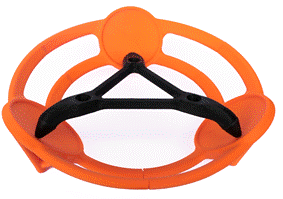
Stage 1 Levelling is achieved using the Static-Levelling Base.
Ensure the Static-Levelling base is firmly placed on the measurement surface (e.g press the unit down into soft ground to prevent movement during measurement).
The GAIA-FIELD can now be placed onto the Static-Levelling Base and using the visible spirit level, coarse levelling can be achieved. The Static-Levelling Base allows for suitable levelling even with ground conditions are off by up to 15°.

Stage 2:

Stage 2 levelling is automatically performed by the internal gimbal.
The gimbal automatically carries out the fine levelling of the system when each measurement is taken. The internal gimbal has approximately 5° of range and can level to milli degree accuracy.
To achieve the fine levelling, navigate to the Measure page and initiate a reading or click on ‘Level’ button.
Levelling Interface
White Box
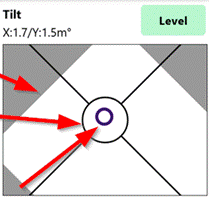
The white section in the levelling interface indicates the range of the gimble.
If the black circle is outside the white box, adjust the position of the GAIA-FIELD unit to be more level.
Purple Bubble
The purple bubble is the tilt of the gravity sensor. Once levelled it should be inside the black circle ( <10 m°).
Levelling Process
The GAIA-FIELD will review the Tilt conditions prior to every measurement (including repeats). If the Tilt value is outside the QA Settings the system will relevel. Typically levelling takes 10 seconds. Default QA settings are 5 m° for the initial measurement and 10 m° for repeats.
Levelling Failed Troubleshooting
Out of range: If the GAIA-FIELD is out of range the system will trigger a levelling error
- Relevel the GAIA-FIELD unit and repeat
High Vibration or Movement: If there is high vibration or movement causing poor tilt measurement the system will trigger a levelling error
- Reduce the vibration or movement and repeat
High Vibration or Movement: If there is high vibration or movement during levelling the system may fail to achieve the required tilt values triggering a levelling error
- Reduce the vibration or movement and repeat